
|
PDQuick Point of Sale Software
|
No Internet POS Software
PDQuick Software Free Trial Offer Keep your own Credit Card Company Use in Your Business 45 days FREE! |
|
|
| IMPORTING INVENTORY FROM YOUR EXCEL DATA FILE |
|
Consult with a local computer expert if necessary as we DO NOT provide voice support for Excel, SQL or any other third party software. |
|
1. Convert up to 8 Excel or CSV fields from your existing inventory data file. 2. Produce a properly formatted CSV data file to seamlessly import into PDQuick Inventory. |
|
Mandatory requirements : 1. Provide an Excel Data File with ALL FIELDS formatted as TEXT ONLY. 2. The Cells must be in the proper order as shown. 3. Surround ALL FIELDS with DOUBLE QUOTES (ex: "YOUR TEXT" ). 4. Non-Compliant Excel Data Files with improperly formatted fields will be rejected.
Excel Example Template (click to download) 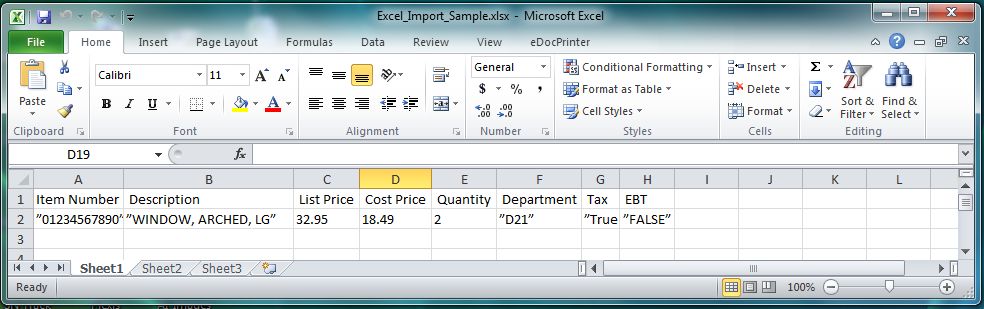
|
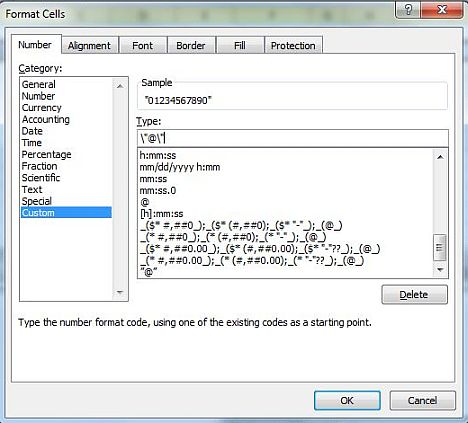
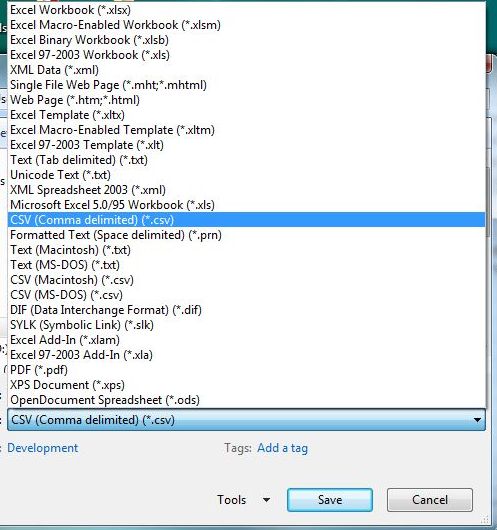
| Click HERE for Data Formats (must be in exact order) |
|
Demo Download Price List Features Screen Samples |
PDQuick Retail Point of Sale Software
Grocery Store POS Software | Convenience Store POS Software Retail POS Software | Liquor Store POS Software |
Our 30 Day Refund Policy About us Contact us Privacy Policy |